STPZAMB support
Contact
Questions, bug reports or ideas: [email protected]. Please tell us your device (iPad or Mac), where you use STPZAMB (the STPZAMB app, AUM, GarageBand or Logic Pro), the STPZAMB version, and the SEED and take you were playing.
Start
- Open STPZAMB and tap Play (▶) on the top bar. The music starts.
- Tap the SEED number and type another, from 0000 to 9999. New take plays the same chords another way; Try another picks a new SEED; the star saves a SEED and take to your list.
- Turn the four mood knobs at the bottom right while it plays. The overview says what each part plays and what each knob does.
- Band | Calm on the top bar, left of the tempo: Calm rests the chords and the texture for a quieter scene.
Style, Swing, Room and Change at
The row under the top bar (version 1.2 or later). Tap one to pick:
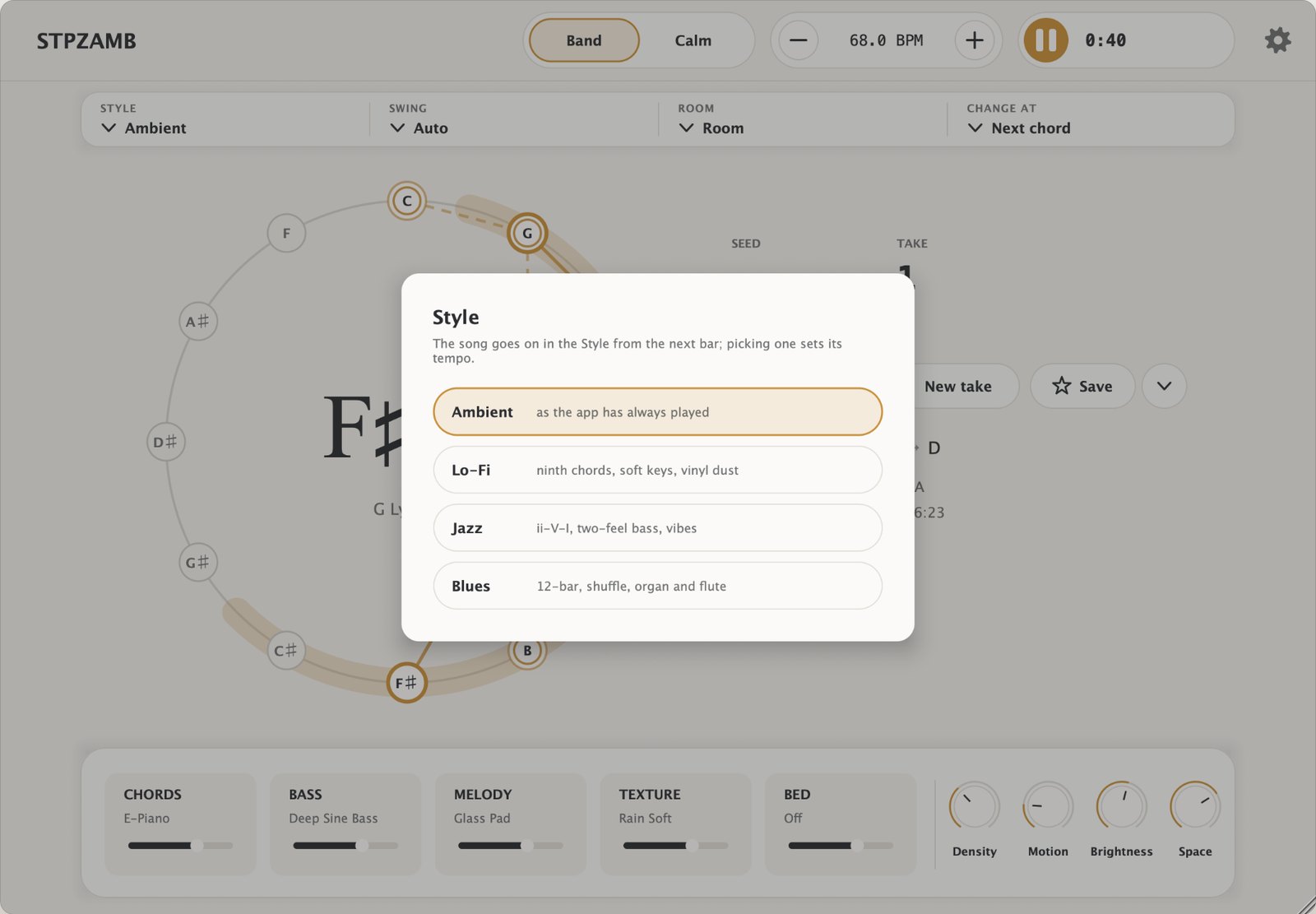
- Style: Ambient (as STPZAMB has always played), Lo-Fi, Jazz or Blues. A new Style comes in at the next bar and the song goes on in it. In the app, picking one also sets its tempo; in a host, the host keeps its tempo.
- Swing: Auto (the Style's own), Straight, Light, Medium or Triplet (a full shuffle).
- Room: Room (close, a short tail) or Hall (wide, a long, slow tail). The SPACE knob sets how much of it.
- Change at: when a new sound comes in: next chord, next bar, next 4 bars or now.
The gear keeps the Look (Paper or Night) and About.
Pick a part's sound
- Tap a part's card at the bottom (CHORDS, BASS, MELODY, TEXTURE or BED). Its sheet opens on what it plays now.
- Pick Off, Band (auto) (the band changes the sound as the piece goes), a Built in sound (grouped by the part it was made for; any part can play any of them) or an STPZMX preset.
- Tap Apply, or double-tap a sound. The new sound comes in at the next chord; tap Now to hear it at once. Close, or a tap outside the sheet, leaves what you did not apply.
When a new sound comes in is set by Change at in the row under the top bar: next chord, next bar, next 4 bars or now. Octave in the sheet moves the part up or down.
RESONATE
In TEXTURE's or BED's sheet, the RESONATE row makes the sound ring in the chord that is playing: Off, Soft (rings 2.5 s) or Deep (6 s, almost a drone). Tap Apply. With BED ringing, Calm rings too. (Version 1.1 or later.)
MIDI out
Each part can send its notes on a MIDI channel: in its sheet, the MIDI OUT row, Off or 1 to 16, then Apply. All parts start Off. With the part's sound set to Off, it is MIDI only. Another plugin gets these notes in a host that routes MIDI between plugins, such as AUM on iPad and Logic Pro on Mac; GarageBand does not.
Step by step: AUM and Logic Pro under Questions.
MIDI out sends the notes, not STPZAMB's mix: see why a part sounds different on another synth.
MIDI out to a device
In the STPZAMB app (not inside a host), each part can play a keyboard, a sound module, a sampler or another app of its own.
- Open the part's sheet and set its MIDI OUT channel. Tap Apply.
- Tap to: under the channels and pick the device. With nothing connected, the list shows None; a device you picked before that is unplugged shows "(not connected)".
- Do the same for each part you want to send: every part has its own device.
Up to version 1.1 the device was in Settings (the gear). Version 1.2 moves it into each part's sheet, and keeps the device for every part that sent to it.
On a Mac, turning on the IAC Driver in Audio MIDI Setup (Window → Show MIDI Studio → IAC Driver → Device is online) gives a port other music apps can listen to.
STPZMX in the STPZAMB app
Every built-in sound is a preset of STPZMX, our synthesizer, sold separately. With STPZMX on the same iPad or Mac, the STPZAMB app's STPZMX tab lists all of its presets, your own too. Pick one for any part; the ✎ on it opens STPZMX's screen. Save a new preset there and the part plays it.
Inside AUM, GarageBand or Logic Pro (version 1.2.1 or later), the STPZMX tab lists the same presets and STPZAMB plays them itself, with no ✎. On iPad, open the STPZAMB app once after installing STPZMX.
Each part on its own channel
Inside a host (version 1.2.3 or later), tap OUTPUT BUS in the row under the top bar. In the Output bus card, set a part to its Out (BASS to Out 3, say), or set ALL to Split for every part. The buses: 1 Mix, 2 CHORDS, 3 BASS, 4 MELODY, 5 TEXTURE, 6 BED. A part left on Mix stays on bus 1. A part on its own bus is quiet until the host has a channel for that bus, so add the channel first (below), then switch the part. The row then reads Mix, 2 split or All split. The bus numbers are not the parts' MIDI channels.
- AUM: the STPZAMB channel (bus 1) plays every part left on Mix. For each part you want on its own channel, first add a channel: + → Multi-bus Audio Unit Instances → STPZAMB, then pick the part's bus by name (CHORDS, BASS, MELODY, TEXTURE, BED). The channel stays quiet until you set that part to its Out in STPZAMB; then the part moves over with no gap. To name the channels, rename them in AUM.
- Logic Pro: load STPZAMB (Multi Output), then add the outputs with the + under the channel strip.
- Ableton Live: on an audio track, Audio From → the STPZAMB track → 3/4 (CHORDS), 5/6 (BASS), 7/8 (MELODY), 9/10 (TEXTURE), 11/12 (BED).
GarageBand uses bus 1 only: keep every part on Mix there.
Questions
Open the STPZAMB app once after installing it. Your iPad or Mac then lists the instrument for other apps. In a host, STPZAMB follows the host's tempo and plays and stops with the host's transport.
General
Do I have to buy it again for the Mac (or the iPad)?
No. STPZAMB is one purchase for iPad and Mac. On your other device, open the App Store with the same Apple ID and go to the STPZAMB page: it shows a download (cloud) button instead of a price.
Do I need STPZMX?
No. STPZAMB has 27 sounds of its own and every feature works without STPZMX. STPZMX adds its other presets and your own sounds, in the STPZAMB app and inside AUM, GarageBand or Logic Pro, and plays parts sent by MIDI out.
Why can't I edit an STPZMX sound inside AUM or GarageBand?
Inside a host, one plug-in can't open another, so STPZAMB plays STPZMX's sounds itself: pick any, edit none. To change one, edit it in the STPZMX app, save it as your own, then pick it in STPZAMB (STPZMX tab → User). (Version 1.2.1 or later.)
I have STPZMX, but the STPZMX tab in AUM shows the App Store.
On iPad, open the STPZAMB app once (on its own, not in AUM). It finds STPZMX and tells STPZAMB in AUM; then open the part's sheet again. (Version 1.2.1 or later.)
With Split on, do I set each AUM channel separately?
No. There is one STPZAMB; buses 2 to 6 are its outputs, not copies. Set it in one place: Band, Calm, the tempo and the four mood knobs change every part; a part's own sheet changes that part; AUM's fader, mute and effects change that channel only.
I set a part to its own bus and it went quiet.
The host has no channel for that bus yet. Add one: in AUM + → Multi-bus Audio Unit Instances → STPZAMB and pick the part's bus; in Logic Pro add the output with the + under the channel strip; in Ableton Live set an audio track's Audio From to that bus. Or set the part back to Mix. Next time add the channel first, then switch the part, and it never goes quiet.
Is a SEED always the same song?
Yes. The same SEED, take and Style play the same chords and notes every time. The sounds, the mood knobs, Room and Calm change how it sounds, not the song.
Can STPZAMB play lo-fi?
Yes. Pick Lo-Fi under Style, in the row under the top bar (version 1.2 or later). STPZAMB then plays short loops of lo-fi chords (ninth chords) on soft keys, with a deep bass, a simple melody on top, the crackle of Vinyl Dust and a light swing. It writes the music as it plays and never ends, so you can use it as a lo-fi music generator: chill background music to study or work to. There are no drums: bring your own beat in AUM or your DAW.
Why doesn't the music start when I open the app?
From version 1.2 STPZAMB waits for you: tap Play (▶) on the top bar. In AUM, GarageBand or another host, the host's play button starts it too.
Why does a new sound wait before it comes in?
So it changes on the music's time, not in the middle of a chord. Change at, in the row under the top bar, sets when: next chord (the start), next bar, next 4 bars or now. Tap Now, or the countdown, to bring it in at once.
Why does a sound play higher or lower than I expected?
Each sound has its own keyboard range. STPZAMB reads that range and moves the part up or down by whole octaves to fit. For an STPZMX sound it is the keyboard range saved in the preset. You see it as "+1 oct" on the sound's button. To change it, open the part's sheet and use Octave. To change it for good, set the keyboard range in STPZMX and save the preset. (Version 1.2 or later.)
What is Calm?
A quieter scene: the chords and the texture rest, and the melody plays a few low notes over the bass and the bed. Use it for bedtime or a break. The switch is on the top bar, left of the tempo.
The tempo reads HOST and I can't change it.
Inside a host, STPZAMB follows the host's tempo: change it in the host. In the STPZAMB app, tap − or + or double-tap the number to type any tempo from 20 to 400 BPM.
MIDI out sends nothing.
Every part starts with MIDI OUT Off. Open the part's sheet, pick a channel in the MIDI OUT row and tap Apply. The card then shows the channel's number. To reach a device from the STPZAMB app, also pick it with to: in the same sheet (see MIDI out to a device).
Can STPZAMB play my keyboard or hardware synth?
Yes, from the STPZAMB app: in a part's sheet give it a MIDI OUT channel, then pick the keyboard with to:. See MIDI out to a device.
Why does a part on STPZMX in AUM sound louder or softer than in the STPZAMB app?
MIDI out sends the notes, not STPZAMB's mix. The mix stays inside STPZAMB: each sound's level on its part, the room (SPACE), RESONATE, the tone and the final limiter. A synth that gets the notes plays them at its own level, so the balance changes: rain or wind comes out much louder, a bell much softer.
- For the sound of the app, let STPZAMB play its own sounds. In AUM it sounds just as it does in the app.
- Use MIDI out to play a part somewhere else and mix it yourself, for example the bass on another synth, a keyboard or a sampler.
- Sending every part to STPZMX? Give each one the preset its part plays in STPZAMB, and pick the sounds in STPZAMB rather than Band (auto), which changes them as the song goes on. Then start AUM's faders at: MELODY 0 dB, CHORDS −3, BASS −9 (Dark Drone −2, Fat Detune and Rubber Bass −12), BED −5 to −14, TEXTURE −15 to −25. Turn AUM's master up, add a reverb for SPACE, and trust your ears.
- STPZAMB also sends each part's swells and rests as expression (CC 11) for synths that follow it. STPZMX does not use it, so its parts do not swell, rest, or go quiet in Calm.
Does it keep playing with the screen off?
Yes, the STPZAMB app on iPad keeps playing when you lock the screen or open another app. Pause it on the top bar.
Does STPZAMB run on iPhone?
No. It is made for the iPad screen, and for the Mac.
GarageBand
On iPad
In a new song, swipe the sound browser to External and tap Audio Unit Extensions → STPZAMB. Press play.
On Mac
Choose a Software Instrument track, then in its instrument slot AU Instruments → STPZ LAB → STPZAMB. Press play.
Can STPZMX play STPZAMB's notes in GarageBand?
No. GarageBand does not pass MIDI from one plugin to another, so STPZAMB's MIDI out has nowhere to go there, and in GarageBand STPZAMB plays its own sounds. To hear a part on STPZMX, pick an STPZMX preset in that part's sheet (the STPZMX tab; inside GarageBand too from version 1.2.1), or use a host that routes MIDI between plugins: AUM on iPad, or Logic Pro on Mac (see Logic Pro).
Logic Pro
On Mac
Choose a Software Instrument track, then in its instrument slot AU Instruments → STPZ LAB → STPZAMB. Press play.
Play a part on another synth
- Track 1: STPZAMB. In the part's sheet set the sound to Off and MIDI OUT to a channel, for example 3.
- Track 2: a Software Instrument track with STPZMX (or any synth).
- On track 2, open the inspector, and in the Track inspector set Internal MIDI In → Instrument Output → the STPZAMB track, with MIDI In Channel set to the same channel.
- Press play.
AUM
On iPad
Tap +, choose Instrument → Audio Unit Extensions → STPZAMB, then press AUM's play button.
Play a part on another synth
- In STPZAMB, set the part's sound to Off and its MIDI OUT to a channel, for example 3.
- Add STPZMX (or any synth) to AUM.
- In that synth's MIDI sources tick STPZAMB, and set its channel filter to the same channel.
Ableton Live
On Mac
- In Live's Settings → Plug-Ins, turn on Use Audio Units v3 and press Rescan.
- In the browser, open Plug-Ins → STPZ LAB and drag STPZAMB onto a MIDI track. Press play.
Does it work in Ableton Live?
Yes, on the Mac in Live 11.3 or later, as an Audio Unit (AUv3) playing its own sounds. Live on Windows takes VST3 plug-ins, and STPZAMB has no Windows version.
Can STPZAMB send MIDI to other tracks in Ableton Live?
Not from inside Live: Live doesn't pass MIDI from Audio Unit plug-ins to other tracks, and on the Mac STPZAMB is an Audio Unit. The STPZAMB app can do it through the Mac's IAC Driver. The app plays on its own clock, not with Live's play and stop.
- Open Audio MIDI Setup → Window → Show MIDI Studio. Double-click IAC Driver, turn on Device is online (Bus 1 is listed; if not, add one with +). It takes effect at once.
- In the STPZAMB app, click a part's card. Pick a channel in the MIDI OUT row (a different one for each part) and click Apply, then click to: → IAC Driver Bus 1. Do the same for each part you want in Live.
- In Live's Settings → Tempo & MIDI (Live 11: Link, Tempo & MIDI), turn on Track for the IAC Driver input. Leave Track off for the IAC Driver output, so MIDI doesn't loop back.
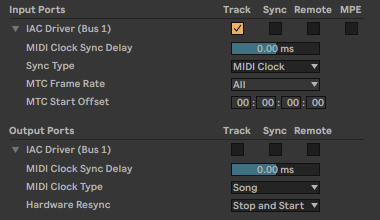
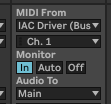
- For each part, make a MIDI track with a synth: MIDI From = IAC Driver (Bus 1) and the part's channel, Monitor = In.
- Click Play in the STPZAMB app. Turn the app's volume down if you only want to hear Live's synths.
No notes in Live? If you changed the IAC Driver after step 2, pick to: again in each part (None, then IAC Driver Bus 1).